





Skip to content

Process 100 pages of bank statements in minutes, not hours.

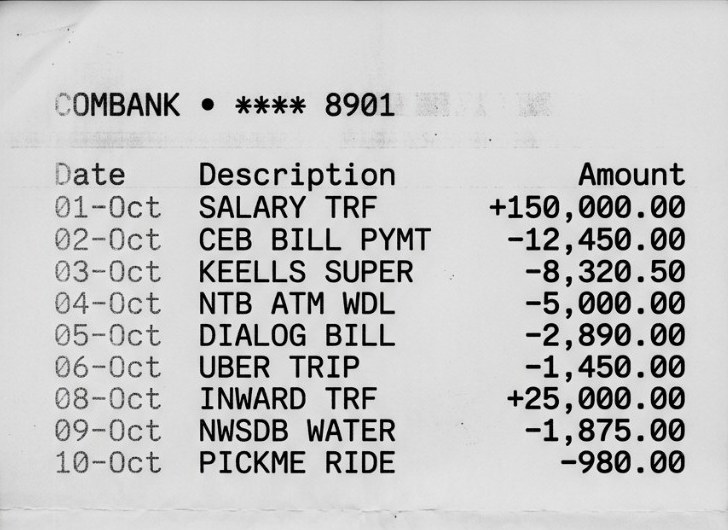
Statements arrive as scanned photocopies — faded, skewed, dot-matrix — and someone has to type every row into Excel. Banksheet reads them, categorises them, and checks every single row against the statement's own running balance.

Try it for free

Compatible with statements from

Commercial BankNations Trust BankSampath BankHatton National BankBank of CeylonPeople's Bank

Works with statements from your banks

Works with Commercial Bank, NTB, Sampath, HNB, Bank of Ceylon, and People's Bank. Tell us which bank you need next.

Commercial Bank
Nations Trust Bank
Sampath Bank
Hatton National Bank
Bank of Ceylon
People's Bank

Request a bank →

Who it's for

Built for the people who still type statements into Excel.

Four desks. The same messy scans. Banksheet gives each of them a clean file on day one.

Audit firms

Audit juniors and audit seniors

Banksheet gives you the full transaction set as clean Excel on day one, every row already verified against the printed balance.

  • Full population in Excel instead of a manual sample
  • Every row reconciled against the statement's own running balance
  • Multi-account, multi-period clients handled in one batch

Accounting and bookkeeping practices

Accountants and bookkeepers

Banksheet turns each scan into categorised transactions ready to import, so the month goes to review instead of data entry.

  • Batch multiple clients and months in one upload
  • Transactions categorised, not just extracted
  • Export to Excel, CSV, or your accounting system

Tax professionals

Tax practitioners and consultants

Banksheet categorises against Sri Lankan tax lines, so what comes out is closer to a return than a spreadsheet.

  • Categories aligned to Sri Lankan tax treatment
  • Inter-account transfers identified rather than double-counted
  • Period filtering for a specific year of assessment

Small and medium businesses

Business owners and finance staff

Banksheet gives you a categorised transaction list without hiring anyone, and clean data to hand your accountant at year end.

  • No accounting software required — Excel is enough
  • Categorised spending you can actually read
  • Hand your accountant clean data instead of a folder of PDFs

Transparent Pricing

Pay only for what you process.

Free Trial

LKR 0

  • 100 pages included
  • All export formats
Try it for free

Most Popular

Professional

LKR 4,000/mo

  • 1,000 pages per month
  • Priority processing
  • Email support
Try it for free

Frequently asked questions

Straight answers for accountants, tax preparers, and business owners.

Which banks does Banksheet support?

Commercial Bank, Nations Trust Bank (NTB), Sampath Bank, Hatton National Bank (HNB), Bank of Ceylon (BOC), and People's Bank. Tell us which bank you need next and we will prioritise it.

Does it work with scanned paper statements?

Yes. Banksheet is built for scanned PDFs, including skewed pages and poor contrast. You do not need a digital-only statement.

How do I try Banksheet?

Sign in to Banksheet to try it now. No credit card is required. For questions, email us.

Is my bank data secure?

Statements are processed over HTTPS and used only to extract your transactions. We do not sell your financial data. Read more on our Security page. Banksheet is operated by LOOMOD (PVT) LTD, a company registered in Sri Lanka.

What file formats can I export?

You can export clean CSV or Excel files ready for accounting tools like QuickBooks and Xero.

Can I use this for Sri Lankan tax filing?

Yes. Transactions are mapped to standard tax and accounting categories used by Sri Lankan finance professionals. Always review the output before filing.